
Synapse Section: Delegated Auth
Specific
ol li::marker { font-size: 150%; color: var(--color-element-green); }
LDAP on Windows AD
In
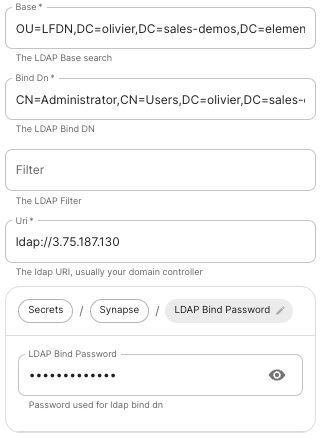
-
Base: the.
The distinguished name of the root level Org Unit in your LDAP directory. - The distinguished name can be displayed by selecting
View/Advanced Featuresin the Active Directory console and then, right-clicking on the object, selectingProperties/Attributes Editor.
Bind DnThe distinguished name of the LDAP account with read access.
FilterA LDAP filter to filter out objects under the LDAP Base DN.
UriThe URI of your LDAP
ldap://dc.example.com.
ldaps:// for SSL connectivity.
The following are the typical ports for Windows AD LDAP servers:
-
ldap://ServerName:389 -
ldaps://ServerName:636
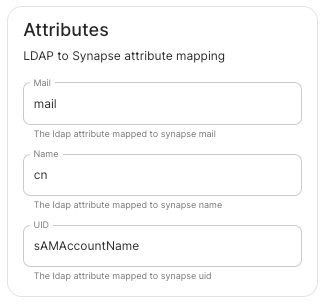
LDAP Bind PasswordThe password of the AD account with read access. LDAP Attributes.
mail
Name.cn
UID.sAMAccountName
OpenID on Microsoft Azure
Before settingconfiguring upwithin the installer, you have to configure Microsoft Azure Active Directory.
Set up Microsoft Azure Active Directory
-
You need to create an
App registration. -
You have to select
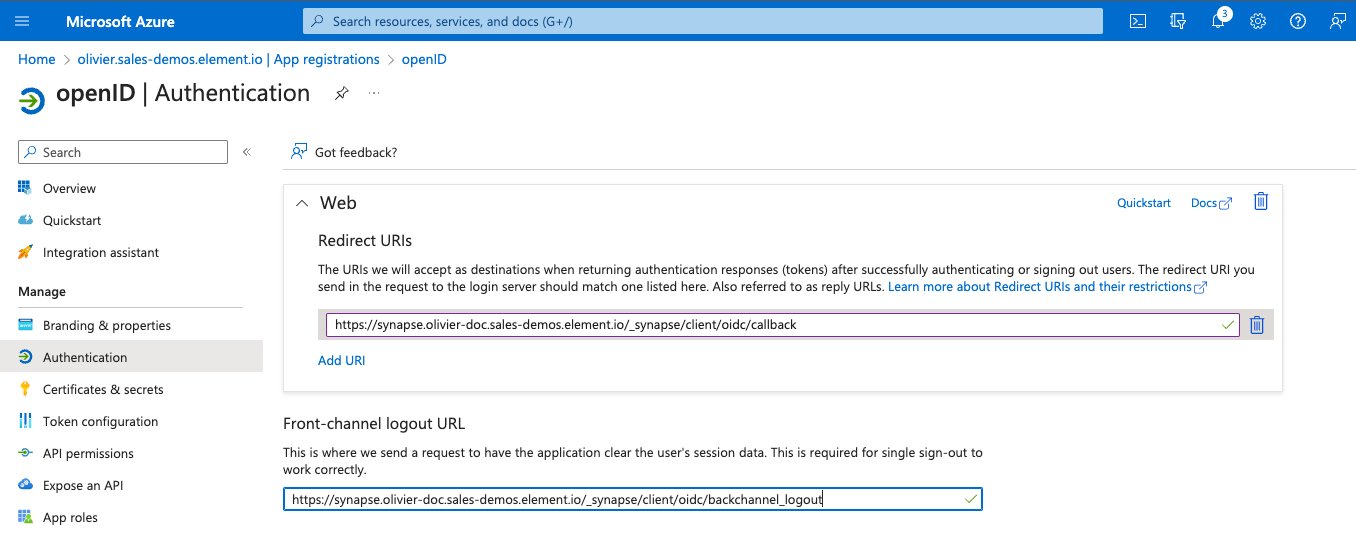
Redirect URI (optional)and set it to the following, wherematrixis the subdomain of Synapse andexample.comis your base domain as configured on the Domains section:https://matrix.your-domain.example.com/_synapse/client/oidc/callback
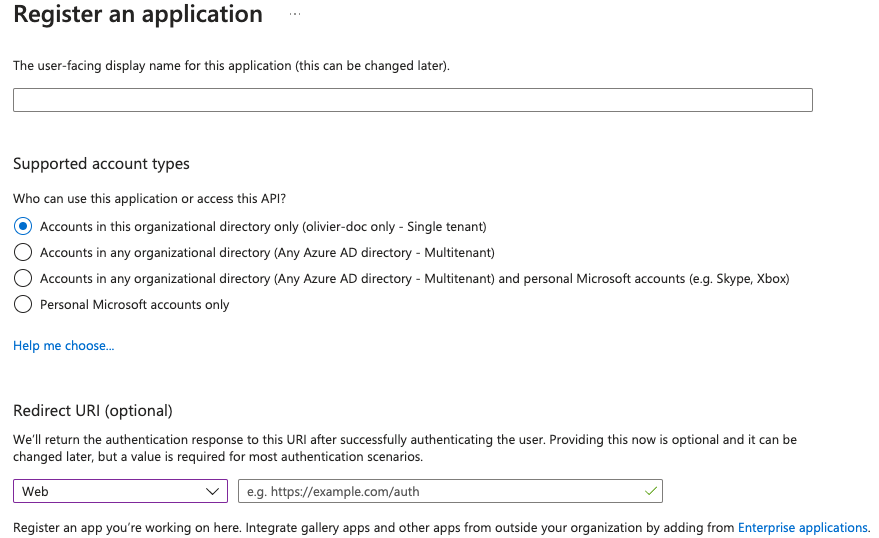
For the bridge to be able to operate correctly, navigate to API permissions, add Microsoft Graph APIs, choose Delegated Permissions and addadd:
-
openid -
profile
email
Remember to grant the admin consent for those.
To setup the installer, you'll needneed:
theThe
Application (client) IDtheThe
Directory (tenant) IDaA secret generated from
Certificates &on the app.secretsSecrets
Configure the installer
Add
an
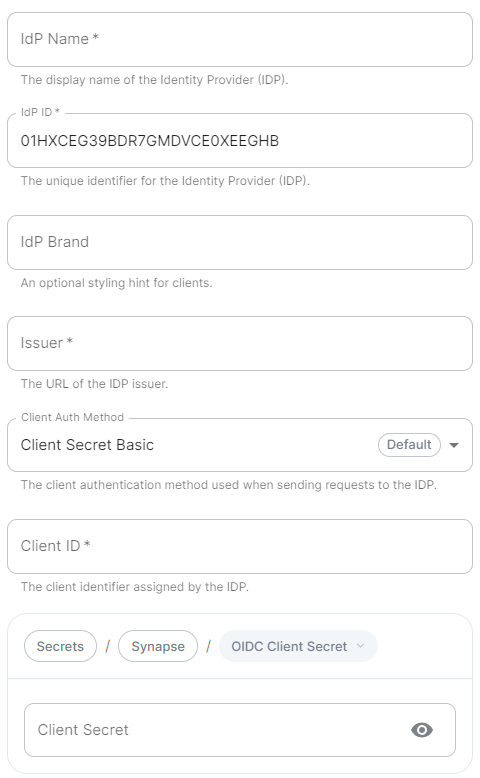
A user-facing name for this identity provider, which is used to offer the user a choice of login mechanisms in the Element UI. IdP ID.
A string identifying your identity provider in
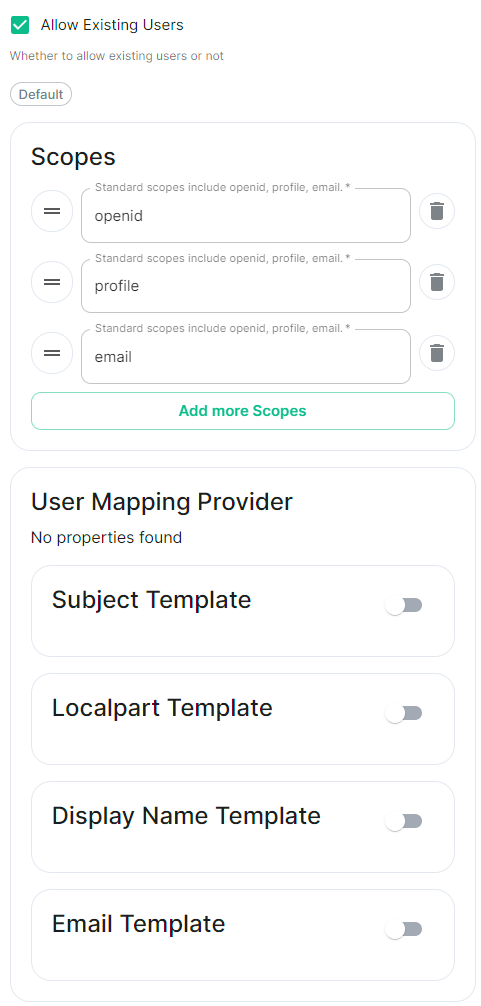
Delegated AuthAllow Existing Users: if checked, it allows a user logging in via OIDC to match a pre-existing account instead of failing. This couldwill be usedauto-generated iffor switchingyou from(but passwordcan loginsbe to OIDC.
AuthorizationIdP Endpoint:Brand.
An optional brand for this identity provider, allowing clients to style the oauth2login authorizationflow endpoint.according Requiredto ifthe identity provider in question.
The OIDC issuer. Used to validate tokens and (if discovery is
https://login.microsoftonline.com/<DirectoryDIRECTORY_TENNANT_ID/v2.0 replacing DIRECTORY_TENNANT_ID.
Client Auth Method.Auth method to use when exchanging the token. Set it to
Client Secret Post or any method supported by your IdP.
Client ID.Set this to your
Application (tenant)client) ID>/oauth2/v2.0/authorize.
Client Secret.Set this to the secret value defined under "Certificates and secrets". Scopes.
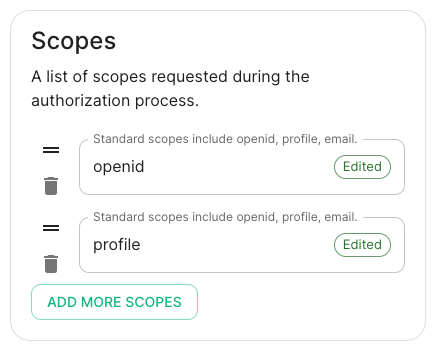
By default
openid, profile and email are added, you shouldn't need to modify these.
User Mapping Provider.Configuration for how attributes returned from a OIDC provider are mapped onto a matrix user.
Jinja2 template for the localpart of the MXID.
Set it to
{{ user.preferred_username.split('@')[0] }}.
Display Name Template.Jinja2 template for the display name to set on first login.
If unset, no displayname will be set. Set it to
{{ user.name }}.
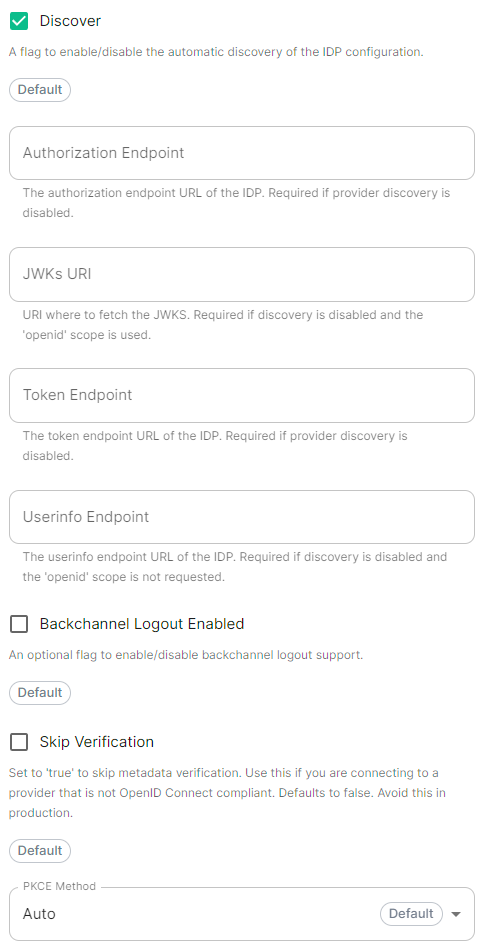
Discover.
Enable / Disable the use of the OIDC discovery mechanism to discover endpoints.
Synapse supports receiving OpenID Connect Back-Channel Logout notifications. This lets the OpenID Connect Provider notify Synapse when a user logs out, so that Synapse can end that user session. This property has to bet set to
https://your-domain/matrix.example.com/_synapse/client/oidc/backchannel_logoutin your identity matrix is the subdomain of Synapse and example.com is your base domain as configured on the Domains section.
OpenID on Microsoft AD FS
Contents
SAML on Microsoft Azure
Set up Microsoft Entra ID
With an account with enough rights, go to : Enterprise Applications
New Application
Click on Create your own application on the top left corner
Choose a name for it, and select Integrate any other application you don't find in the gallery
Click on "Create"
Select Set up single sign on
Select SAML
ClientEditAuthon MethodBasic SAML Configuration
Identifier , add the following URL : https://synapse_fqdn/_synapse/client/saml2/metadata.xml
Reply URL , add the following URL : https://synapse_fqdn/_synapse/client/saml2/authn_response
Click on Save
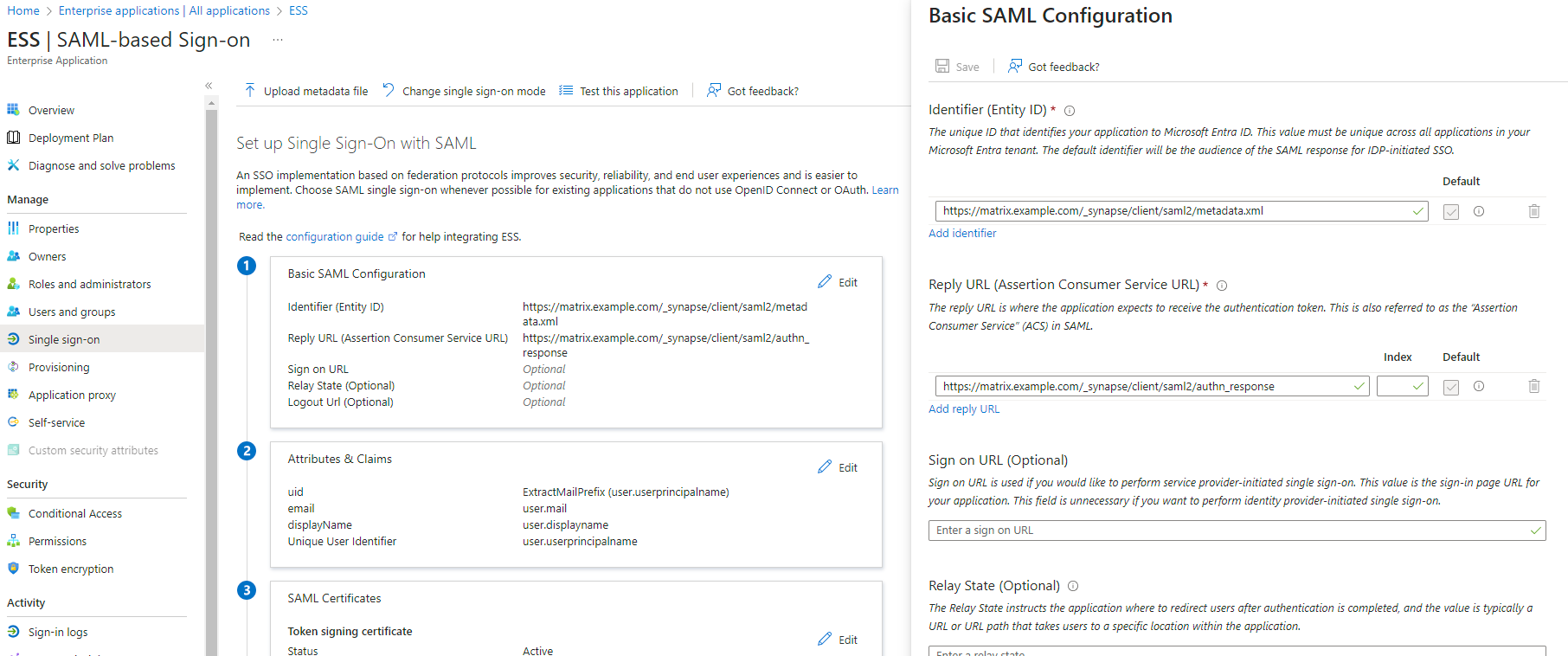
App Federation Metadata Url under SAML Certificates as this will be required in a later step.
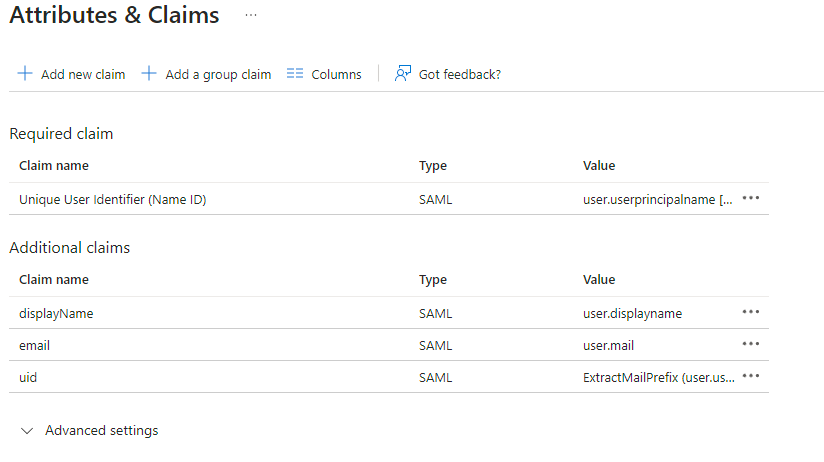
Edit on Attributes & Claims
Remove all defaults for additional claims
Click on Add new claim to uid , Transformation : ExtractMailPrefix , Parameter 1 : user.userprincipalname
Name: email , Source attribute : user.mail
Name: displayName , Source attribute : user.displayname
Click on Save
Users and Groups and add groups and users which may have access to element
Configure the installer
Add a SAML provider in the 'Synapse' configuration after enabling ClientDelegated Secret PostAuthorand anyset methodthe supportedfollowing by(suggested) yourfields Idpin the installer:
Checked Attribute Map.
Select
URN:Oasis:Names:TC:SAML:2.0:Attrname Format:Basic as the Identifier
ClientMapping.
Set ID:the yourfollowing mappings:
ApplicationPrimary (client)Emailemail
From: DiscoverFirst Name: enable/disableTo: the use of the OIDC discovery mechanism to discover endpoints
firstname
Idp Brand: an optional brand for this identity provider, allowing clients to style the login flow according to the identity provider in question
Idp ID: a string identifying your identity provider in your configuration
Idp Name: A user-facing name for this identity provider, which is used to offer the user a choice of login mechanisms in the Element UI. In the screenshot bellow,From: IdpLast Nameis set toTo: Azure ADlastname
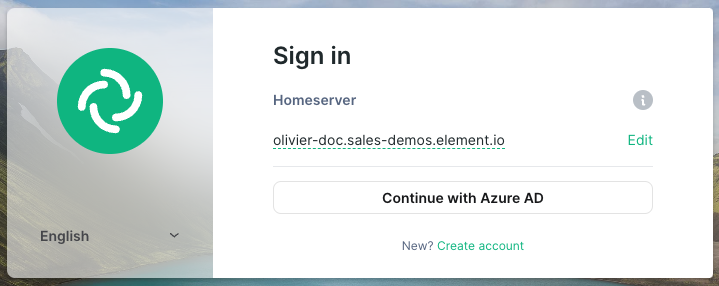
IssuerToken EndpointClient Secret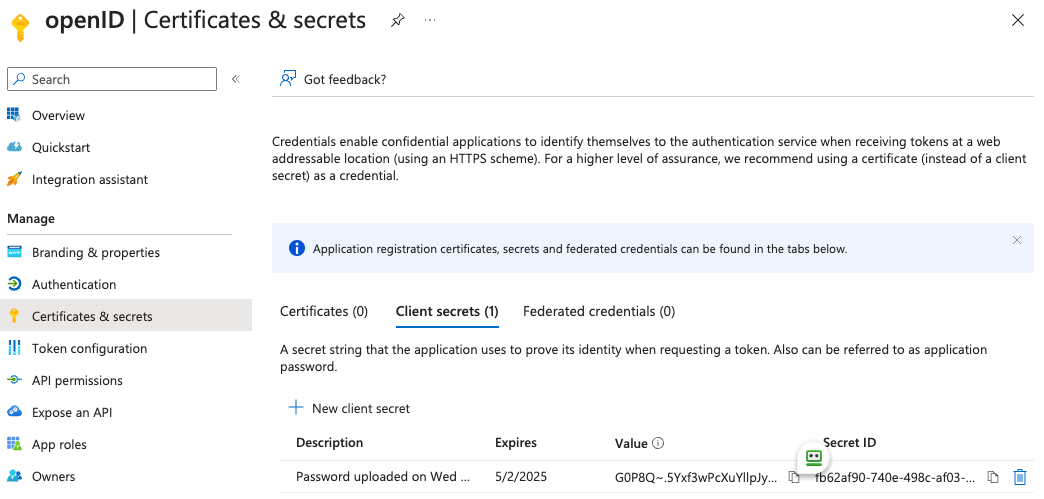
Scopes: add every scope on a different line
Entity.
Entity ID. (From Azure) Name.
User Mapping
Set

-
LocalpartMXIDTemplateMappingJinja2 template for the localpart of the MXID. Set it to{{ user.preferred_username.split('@')[0] }}Dotreplacefor Azure AD -
DisplayMXIDNameSourceTemplateAttributeJinja2 template for the display name to set on first login. If unset, no displayname will be set. Set it to{{ user.name }}uidfor Azure AD
Other configurations are documented here.
OpenID
Add