Disclaimer: This guide refers to using the Element Matrix clients, Element Web or Element Desktop apps
### Accessing Help & About You can change your Matrix account settings by clicking your profile icon in the top left of the Element client. By default, this will be a colored circle with the first letter of your Matrix ID. From the presented drop-down menu, you'll be able to jump into specific settings straight away, or access `All Settings`. Clicking `All Settings` will take you first to `General` settings, click `Help & About` in the vertical navigation menu on the left to open the `Help & About` page.Info: The below setting layout / order may change in subsequent client updates, however generally most settings will still perform the same function.
### Help & About [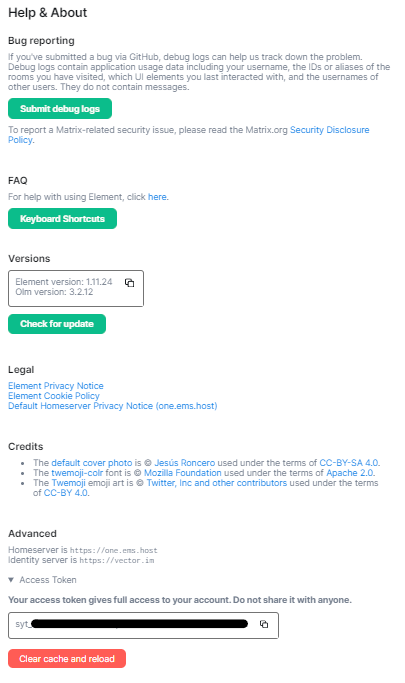](https://ems-docs.element.io/uploads/images/gallery/2023-03/image-1678909486024.png) From Help & About you can find important information related to the client itself, such as it's current version, your homeserver and identity server details as well as links to our FAQ, Legal documents and credits. #### Your Access Token Your access token gives full access to your account via the use of Matrix APIs, you can read more about them depending on your needs. If you are an Admin of a homeserver, and are using an account with Admin access, you can make use of the Synapse Admin API. For both admins and regular users, the Matrix APIs can be found from the latest Matrix Spec page - these include: - Client-Server API - Server-Server API - Application Service API - Identity Service API - Push Gateway API #### Bug Reporting If you've experience a bug, the best place to report it is by submitting a bug report to the appropriate Github repository for your client, the Element account.