# Changing a Matrix Account password

<!---
Actions needed:
- [ ] 

# Changing a Matrix Account password
--->

<!---<p class="callout info">Remember to check our <a href="https://ems-docs.element.io/books/kieranml-test-book/page/have-you-tried-httpselementiohelp">Looking for help?</a> page for answers to Frequently Asked Questions and our User Guide!</p>--->

<p class="callout warning"><b>Disclaimer:</b> This guide refers to using the Element Matrix clients, <a href="https://app.element.io/" target="_blank" rel="noopener noreferrer">Element Web</a> or <a href="https://element.io/download" target="_blank" rel="noopener noreferrer">Element Desktop</a> apps</p>

### Changing your Matrix Account password

<p class="callout warning">If you don't know your password, you'll need to recover your account, see our <a href="https://ems-docs.element.io/books/element-support/page/recovering-a-matrix-account">Recovering a Matrix Account</a> page for instructions.</p>

1. Go to Element `All settings`
	[![](https://ems-docs.element.io/uploads/images/gallery/2024-07/scaled-1680-/image-1721651752111-24-15-
	
	You might want to export your `E2E room keys`. Just to be on the safe side in case something goes wrong. See also [Export and Import E2E Room Keys](https://ems-docs.element.io/books/element-support/page/export-and-import-e2e-room-keys)

2. Enter your current password and your new password
	[![](https://ems-docs.element.io/uploads/images/gallery/2024-07/scaled-1680-/image-1721651780042-26-13-pm.png)](https://ems-docs.element.io/uploads/images/gallery/2024-07/image-1721651780042-26-13-pm.png)
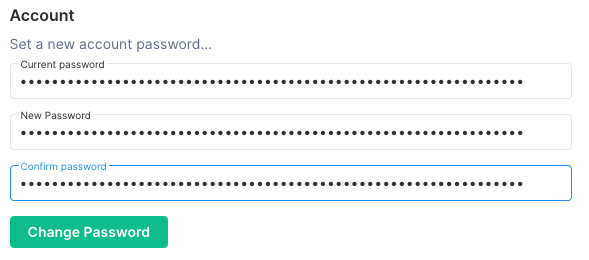


3. Click `OK`
	[![](https://ems-docs.element.io/uploads/images/gallery/2024-07/scaled-1680-/image-1721651805137-31-01-pm.png)](https://ems-docs.element.io/uploads/images/gallery/2024-07/image-1721651805137-31-01-pm.png)


4. You now need to sign in again on all your other devices

### Changing a Matrix Account password on your Homeserver

If you're an EMS customer, you can create your users via the <a href="https://ems.element.io/user/hosting#/admin" target="_blank" rel="noopener noreferrer">Server Admin</a> tab of the <a href="https://ems.element.io/user/hosting" target="_blank" rel="noopener noreferrer">EMS Control Panel</a>.
<!---Check out the [Server Admin]() section of the [EMS Control Panel]() doc for more guidance.--->

Alternatively you can make use of the <a href="https://matrix-org.github.io/synapse/latest/usage/administration/admin_api/" target="_blank" rel="noopener noreferrer">Synapse Admin API</a> to change a Matrix Account password on a homeserver you hold an Admin account on. To do so, you will need to use <a href="https://matrix-org.github.io/synapse/latest/admin_api/user_admin_api.html#create-or-modify-account" target="_blank" rel="noopener noreferrer">Create or Modify Account</a> from the <a href="https://matrix-org.github.io/synapse/latest/admin_api/user_admin_api.html#user-admin-api" target="_blank" rel="noopener noreferrer">User Admin API</a>.
<!---For more information on using the <a href="https://matrix-org.github.io/synapse/latest/usage/administration/admin_api/" target="_blank" rel="noopener noreferrer">Synapse Admin API</a> check our [Getting Started using the Admin API]() documentation.--->

```
https://HOMESERVER_URL/_synapse/admin/v2/users/FULL_USERNAME
```

```json
{
    "password": "new_password"
}
```