# Authentication Section

<!-- Page description found under page header in Chapter View -->

<p hidden>A detailed look at Delegated Authentication options available and setup examples.</p>

<p hidden>&nbsp;&nbsp;&nbsp;&nbsp;&nbsp;&nbsp;&nbsp;&nbsp;&nbsp;&nbsp;&nbsp;&nbsp;&nbsp;&nbsp;&nbsp;&nbsp;&nbsp;</p>

<p hidden>&nbsp;&nbsp;&nbsp;&nbsp;&nbsp;&nbsp;&nbsp;&nbsp;&nbsp;&nbsp;&nbsp;&nbsp;&nbsp;&nbsp;&nbsp;&nbsp;&nbsp;</p>

<p hidden>&nbsp;&nbsp;&nbsp;&nbsp;&nbsp;&nbsp;&nbsp;&nbsp;&nbsp;&nbsp;&nbsp;&nbsp;&nbsp;&nbsp;&nbsp;&nbsp;&nbsp;</p>

<!-- `&nbsp;` used to prevent following text appearing in view -->


<div class="toggle-container" style="float: right;">
  <label for="toggle-switch">Config:</label>
  <label class="switch">
    <input type="checkbox" id="bkmrk-toggle-switch">
    <span class="slider round"></span>
  </label>
</div>
<br />

In the Authentication section you will find options to configure settings specific to Authentication. Regardless of if you are using the Matrix Authentication Server, or have enabled Legacy Auth, the settings on this page will remain the same.


However please note, MAS does not support delegated authentication with SAML or GroupSync - if you wish to enable either of these you will need to return to the Host section and enable [Legacy Auth](https://ems-docs.element.io/books/element-server-suite-classic-documentation-lts-2410/page/host-section#bkmrk-legacy-auth).


<p class='cog'>All settings configured via the UI in this section will be saved to your <code>deployment.yml</code>, with the contents of secrets being saved to <code>secrets.yml</code>. You will find specific configuration examples in each section.</p>


<details class='cog'>

<summary>Config Example</summary>


- `deployment.yml`

  ```yml

  metadata:

  annotations:

    ui.element.io/layer: |

      components:

        synapse:

  spec:

    components:

      synapse:

        config:

          delegatedAuth:

  ```

- `secrets.yml`

  ```yml

  kind: Secret

  metadata:

    name: synapse

    namespace: element-onprem

  data:

  ```

</details>


<p class='cog'>By default, if you do not change any settings on this page, defaults will be added to your configuration file/s (see example below).</p>


<details class='cog'>

<summary>Config Example</summary>


- `deployment.yml`

  ```yml

  metadata:

    annotations:

      ui.element.io/layer: |

        components:


  spec:

    synapse:

      config:

        delegatedAuth:

          localPasswordDatabase:

            enableRegistration: false # Note, if you deploy without any authentication methods enabled, the installer will default to Local Accounts.

  ```

- `secrets.yml`

  ```yml

  apiVersion: v1

  kind: Secret

  metadata:


  data:

    ldapBindPassword: examplePassword    

  ```

</details>


### User Profiles


[![](https://ems-docs.element.io/uploads/images/gallery/2024-11/scaled-1680-/image-1731079161328.png)](https://ems-docs.element.io/uploads/images/gallery/2024-11/image-1731079161328.png)


<details class='cog'>

<summary>Config Example</summary>


```yml

spec:

  components:

    synapse:

      config:

        delegatedAuth:

          userProfiles:

            allowAvatarChange: true # Not present if left as default

            allowDisplayNameChange: true # Not present if left as default

            allowEmailChange: true # Not present if left as default

```

</details>


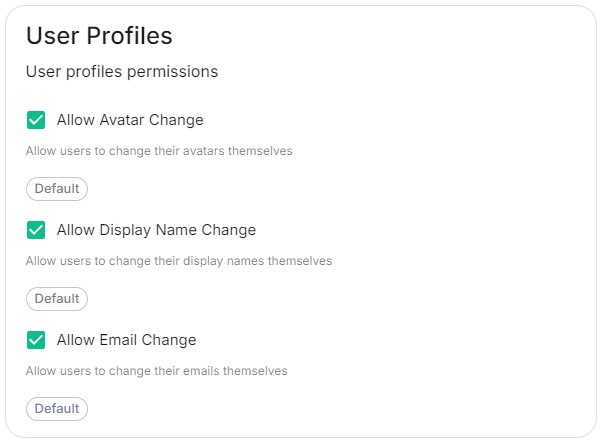
The User Profiles section provides some self-explanatory config options to adjust what changes users are allowed to make to their User Profile, such as changing their Display Name. You may wish to restrict this if you'd prefer to delegate the setting of these values to the associated Identity Provider.


### OIDC


You can add and configure one, or multiple, OIDC providers - to do so you will need to click the `Add OIDC` / `Add more OIDC` button found after toggling on the ODIC section:


[![](https://ems-docs.element.io/uploads/images/gallery/2024-12/scaled-1680-/image-1733393799171.png)](https://ems-docs.element.io/uploads/images/gallery/2024-12/image-1733393799171.png)
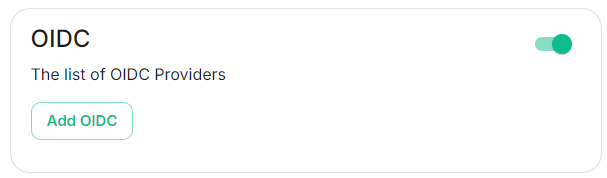


Once an OIDC provider is added, you can remove any providers by clicking the rubbish bin icon found to the left of the provider.


<details class='cog'>

<summary>Config Example</summary>


```yml

spec:

  components:

    synapse:

      config:

        delegatedAuth:

          oidc:

            - 

```

</details>


#### IdP Name


[![](https://ems-docs.element.io/uploads/images/gallery/2024-12/scaled-1680-/image-1733394158337.png)](https://ems-docs.element.io/uploads/images/gallery/2024-12/image-1733394158337.png)


<details class='cog'>

<summary>Config Example</summary>


```yml

spec:

  components:

    synapse:

      config:

        delegatedAuth:

          oidc:

              idpName: example_name # Required

```

</details>


#### IdP ID


[![](https://ems-docs.element.io/uploads/images/gallery/2024-12/scaled-1680-/image-1733394178680.png)](https://ems-docs.element.io/uploads/images/gallery/2024-12/image-1733394178680.png)


<details class='cog'>

<summary>Config Example</summary>


```yml

spec:

  components:

    synapse:

      config:

        delegatedAuth:

          oidc:

              idpId: 01JDS2WKNYTQS21GFAKM9AKD9R # Required

```

</details>


#### IdP Brand


[![](https://ems-docs.element.io/uploads/images/gallery/2024-12/scaled-1680-/image-1733394191621.png)](https://ems-docs.element.io/uploads/images/gallery/2024-12/image-1733394191621.png)


<details class='cog'>

<summary>Config Example</summary>


```yml

spec:

  components:

    synapse:

      config:

        delegatedAuth:

          oidc:

              idpBrand: example_brand

```

</details>


#### Issuer


[![](https://ems-docs.element.io/uploads/images/gallery/2024-12/scaled-1680-/image-1733394204150.png)](https://ems-docs.element.io/uploads/images/gallery/2024-12/image-1733394204150.png)


<details class='cog'>

<summary>Config Example</summary>


```yml

spec:

  components:

    synapse:

      config:

        delegatedAuth:

          oidc:

              issuer: https://issuer.example.com/ # Required

```

</details>


#### Client Auth Method


[![](https://ems-docs.element.io/uploads/images/gallery/2024-12/scaled-1680-/image-1733394220401.png)](https://ems-docs.element.io/uploads/images/gallery/2024-12/image-1733394220401.png)


<details class='cog'>

<summary>Config Example</summary>


```yml

spec:

  components:

    synapse:

      config:

        delegatedAuth:

          oidc:

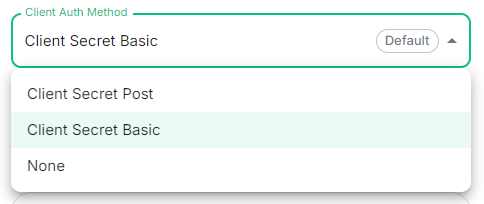
              clientAuthMethod: client_secret_basic # If no `clientAuthMethod` defined, will default to `client_secret_basic`

              # clientAuthMethod: client_secret_post

              # clientAuthMethod: none

```

</details>


#### Client ID


[![](https://ems-docs.element.io/uploads/images/gallery/2024-12/scaled-1680-/image-1733394233906.png)](https://ems-docs.element.io/uploads/images/gallery/2024-12/image-1733394233906.png)


<details class='cog'>

<summary>Config Example</summary>


```yml

spec:

  components:

    synapse:

      config:

        delegatedAuth:

          oidc:

              clientId: example_client_id

```

</details>


#### Client Secret


[![](https://ems-docs.element.io/uploads/images/gallery/2024-12/scaled-1680-/image-1733394248503.png)](https://ems-docs.element.io/uploads/images/gallery/2024-12/image-1733394248503.png)


<details class='cog'>

<summary>Config Example</summary>


- `deployment.yml` 

    ```yml

    spec:

      components:

        synapse:

          config:

            delegatedAuth:

              oidc:

                  clientSecretSecretKey: oidcClientSecret

    ```

- `secrets.yml`

    ```yml

    apiVersion: v1

    kind: Secret

    metadata:

      name: synapse

      namespace: element-onprem

    data:

      oidcClientSecret: U2VjdXJlT0lEQ0NsaWVudFNlY3JldA==

    ```

</details>


#### Allow Existing Users


[![](https://ems-docs.element.io/uploads/images/gallery/2024-12/scaled-1680-/image-1733394259592.png)](https://ems-docs.element.io/uploads/images/gallery/2024-12/image-1733394259592.png)


<details class='cog'>

<summary>Config Example</summary>


```yml

spec:

  components:

    synapse:

      config:

        delegatedAuth:

          oidc:

```

</details>


#### Scopes


[![](https://ems-docs.element.io/uploads/images/gallery/2024-12/scaled-1680-/image-1733394434255.png)](https://ems-docs.element.io/uploads/images/gallery/2024-12/image-1733394434255.png)


<details class='cog'>

<summary>Config Example</summary>


```yml

spec:

  components:

    synapse:

      config:

        delegatedAuth:

          oidc:

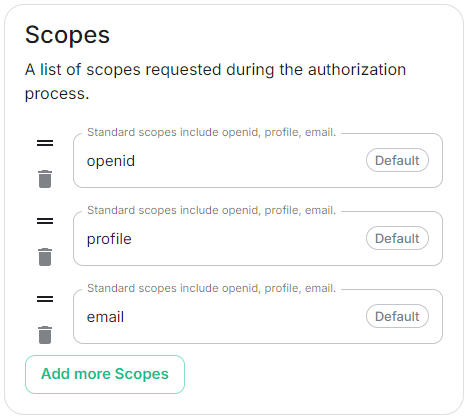
              scopes:

                - openid

                - profile

                - email

```

</details>


#### User Mapping Provider


<details class='cog'>

<summary>Config Example</summary>


```yml

spec:

  components:

    synapse:

      config:

        delegatedAuth:

          oidc:

              userMappingProvider:

```

</details>


##### Subject Template


[![](https://ems-docs.element.io/uploads/images/gallery/2024-12/scaled-1680-/image-1733394507814.png)](https://ems-docs.element.io/uploads/images/gallery/2024-12/image-1733394507814.png)


<details class='cog'>

<summary>Config Example</summary>


```yml

spec:

  components:

    synapse:

      config:

        delegatedAuth:

          oidc:

              userMappingProvider:

                subjectTemplate: '{{ user.subject }}'

```

</details>


##### Localpart Template


[![](https://ems-docs.element.io/uploads/images/gallery/2024-12/scaled-1680-/image-1733394516417.png)](https://ems-docs.element.io/uploads/images/gallery/2024-12/image-1733394516417.png)


<details class='cog'>

<summary>Config Example</summary>


```yml

spec:

  components:

    synapse:

      config:

        delegatedAuth:

          oidc:

              userMappingProvider:

                localpartTemplate: '{{ user.preferred_username }}'

```

</details>


If using legacy auth, you should use jinja python to format your template; if using MAS, you should use jinja rust formatting instead. For example, to get the a valid localpart from an email, you would use `{{ user.preferred_username.split('@')[0] }}` if using Legacy Auth, or `{{ (user.preferred_username | split('@'))[0] }}` if using MAS.


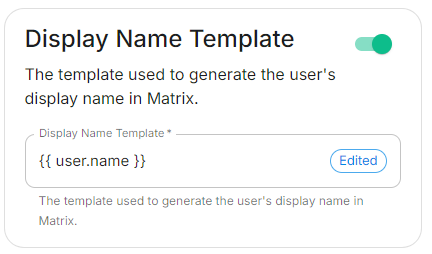
##### Display Name Template


[![](https://ems-docs.element.io/uploads/images/gallery/2024-12/scaled-1680-/image-1733394524368.png)](https://ems-docs.element.io/uploads/images/gallery/2024-12/image-1733394524368.png)


<details class='cog'>

<summary>Config Example</summary>


```yml

spec:

  components:

    synapse:

      config:

        delegatedAuth:

          oidc:

              userMappingProvider:

                displayNameTemplate: '{{ user.name }}'

```

</details>


##### Email Template


[![](https://ems-docs.element.io/uploads/images/gallery/2024-12/scaled-1680-/image-1733394535189.png)](https://ems-docs.element.io/uploads/images/gallery/2024-12/image-1733394535189.png)


<details class='cog'>

<summary>Config Example</summary>


```yml

spec:

  components:

    synapse:

      config:

        delegatedAuth:

          oidc:

              userMappingProvider:

                emailTemplate: '{{ user.email }}'

```

</details>


#### Endpoints Discovery


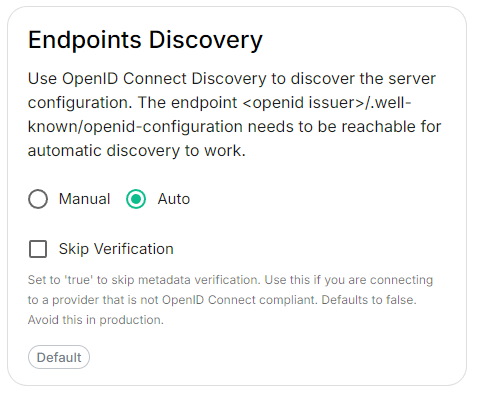
##### Auto Discovery


[![](https://ems-docs.element.io/uploads/images/gallery/2024-12/scaled-1680-/image-1733394564362.png)](https://ems-docs.element.io/uploads/images/gallery/2024-12/image-1733394564362.png)


<details class='cog'>

<summary>Config Example</summary>


```yml

spec:

  components:

    synapse:

      config:

        delegatedAuth:

          oidc:

            - clientId: synapsekieranml

              clientSecretSecretKey: oidcClientSecret

              endpointsDiscovery:

                skipVerification: false

              idpId: 01JDS2WKNYTQS21GFAKM9AKD9R

              idpName: Keycloak

              issuer: https://keycloak.ems-support.element.dev/realms/matrix

              scopes:

                - openid

                - profile

                - email

              userMappingProvider:

                displayNameTemplate: '{{ user.name }}'

                emailTemplate: '{{ user.email }}'

```

</details>


###### Skip Verification


<details class='cog'>

<summary>Config Example</summary>


```yml

spec:

  components:

    synapse:

      config:

        delegatedAuth:

          oidc:

            - clientId: synapsekieranml

              clientSecretSecretKey: oidcClientSecret

              endpointsDiscovery:

                skipVerification: false

              idpId: 01JDS2WKNYTQS21GFAKM9AKD9R

              idpName: Keycloak

              issuer: https://keycloak.ems-support.element.dev/realms/matrix

              scopes:

                - openid

                - profile

                - email

              userMappingProvider:

                displayNameTemplate: '{{ user.name }}'

                emailTemplate: '{{ user.email }}'

```

</details>


#### Backchannel Logout Enabled


<p class='callout warning'>The Matrix Authentication Service does not support configuring Backchannel Logout. You can only configure Backchannel logout if you have enabled <a href='https://ems-docs.element.io/link/684#bkmrk-legacy-auth-section'><code>Legacy Auth</code></a> from the <a href='https://ems-docs.element.io/books/element-server-suite-documentation-lts-2410/page/host-section'>Host Section</a>.</p>


[![](https://ems-docs.element.io/uploads/images/gallery/2024-12/scaled-1680-/image-1733394576293.png)](https://ems-docs.element.io/uploads/images/gallery/2024-12/image-1733394576293.png)


<details class='cog'>

<summary>Config Example</summary>


```yml

spec:

  components:

    synapse:

      config:

        delegatedAuth:

          oidc:

            - clientId: synapsekieranml

              clientSecretSecretKey: oidcClientSecret

              endpointsDiscovery:

                skipVerification: false

              idpId: 01JDS2WKNYTQS21GFAKM9AKD9R

              idpName: Keycloak

              issuer: https://keycloak.ems-support.element.dev/realms/matrix

              scopes:

                - openid

                - profile

                - email

              userMappingProvider:

                displayNameTemplate: '{{ user.name }}'

                emailTemplate: '{{ user.email }}'

```

</details>


### SAML


<p class='callout warning'>The Matrix Authentication Service does not support SAML and it is recommended to switch to OIDC. You can only enable SAML authentication if you have enabled <a href='https://ems-docs.element.io/link/684#bkmrk-legacy-auth-section'><code>Legacy Auth</code></a> from the <a href='https://ems-docs.element.io/books/element-server-suite-documentation-lts-2410/page/host-section'>Host Section</a>.</p>


### LDAP


### Local Accounts