# Synapse Section: Workers
The `Workers` section, which allows you to configure [Synape Workers](https://element-hq.github.io/synapse/latest/workers.html), is available under the 'Advanced' section of the `Synapse` page.
### What are Synapse Workers
Synapse is built on Python, an inherent limitation of which is only being able to execute one thread at a time (due to the GIL). To allow for horizontal scaling Synapse is built to split out functionality into multiple separate python processes. While for small instances it is recommended to run Synapse in the default monolith mode, for larger instances where performance is a concern it can be helpful to split out functionality into these separate processes, called Workers.
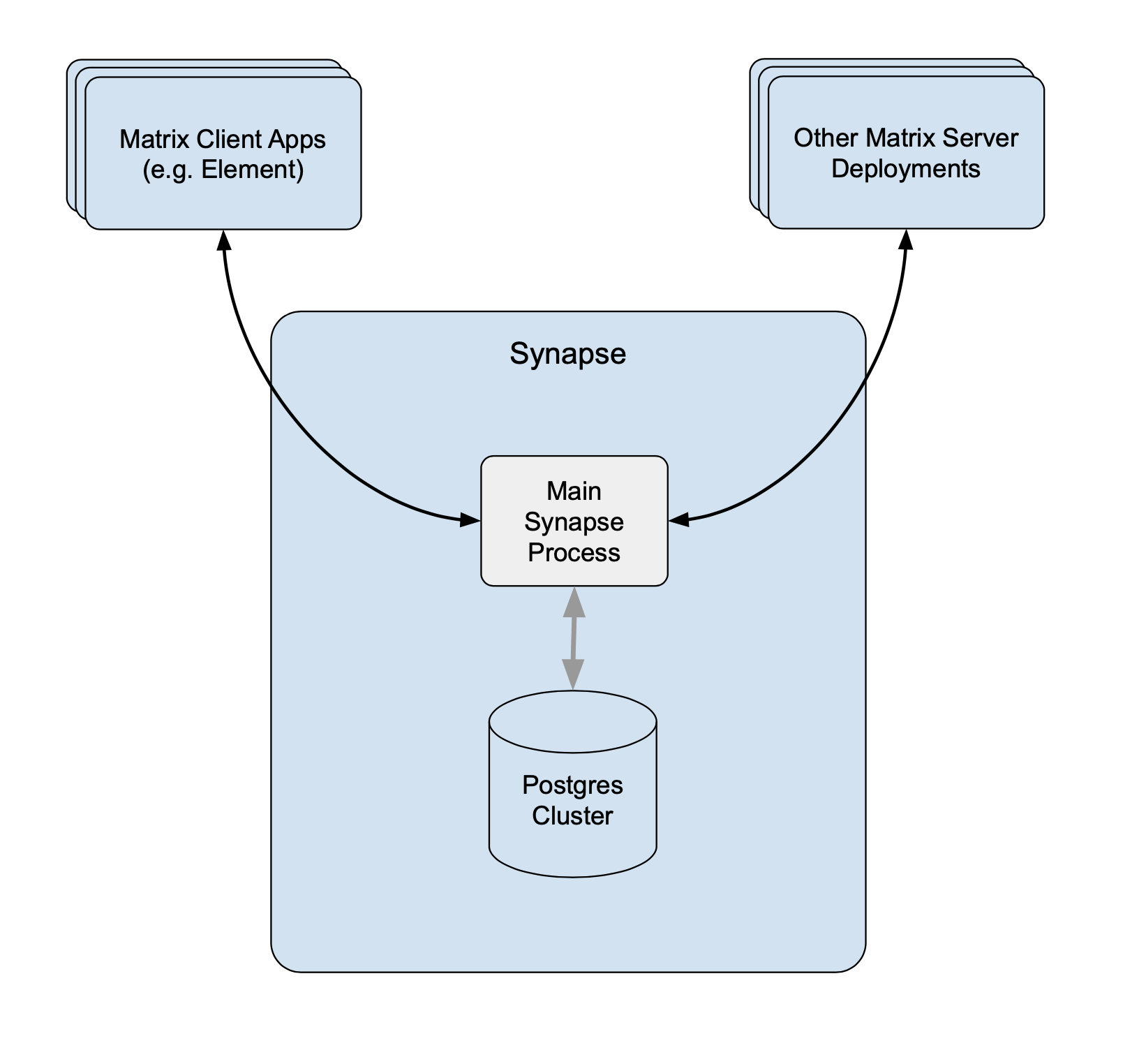 Without Workers Without Workers |
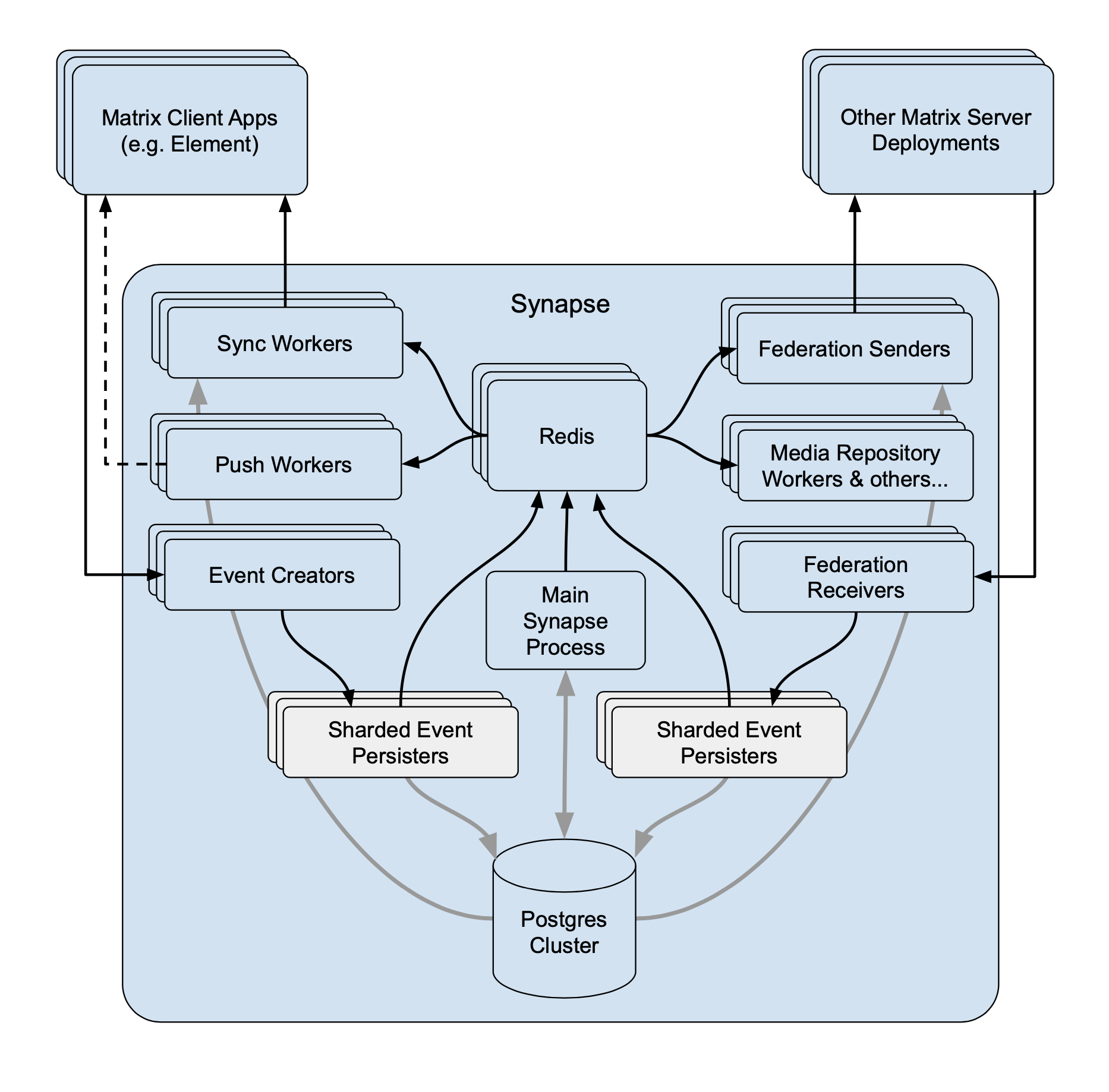 With Workers With Workers |
For a detailed high-level overview of workers, see the [How we fixed Synapse's Scalability](https://matrix.org/blog/2020/11/03/how-we-fixed-synapse-s-scalability/) blogpost.
#### Benefits of Using Workers
1. **Scalability****.** By distributing tasks across multiple processes, Synapse can handle more concurrent operations and better utilize system resources.
2. **Fault Isolation****.** If a specific worker crashes, it only affects the functionality it handles, rather than bringing down the entire server.
3. **Performance Optimisation****.** By dedicating workers to specific high-demand tasks, you can improve the overall performance by removing bottlenecks.
#### Worker ↔ Synapse Communication
The separat Worker processes communicate with each other via a Synapse-specific protocol called 'replication' (analogous to MySQL- or Postgres-style database replication) which feeds streams of newly written data between processes so they can be kept in sync with the database state.
Synapse uses a Redis pub/sub channel to send the replication stream between all configured Synapse processes. Additionally, processes may make HTTP requests to each other, primarily for operations which need to wait for a reply ─ such as sending an event.
All the workers and the main process connect to Redis, which relays replication commands between processes with Synapse using it as a shared cache and as a pub/sub mechanism.
### How to configure
[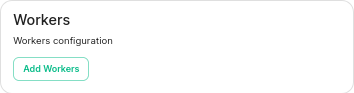](https://ems-docs.element.io/uploads/images/gallery/2023-06/image-1687357253633.png)
Click on Add Workers
[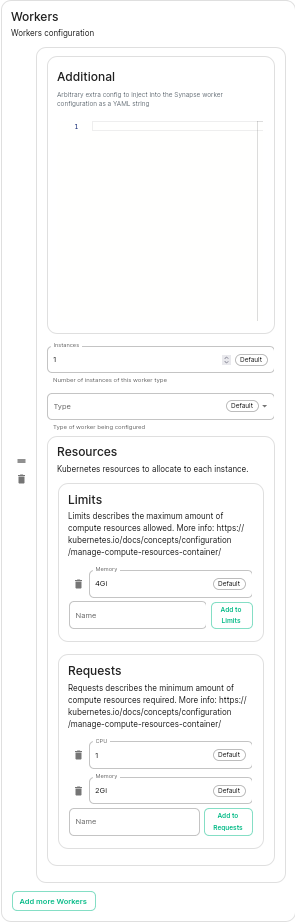](https://ems-docs.element.io/uploads/images/gallery/2023-06/image-1687357284426.png)
You have to select a Worker Type. Here are the workers which can be useful to you :
- **Pushers****.**
If you experience slowness with notifications sending to clients
- **Client-Reader****.**
If you experience slowness when clients login and sync their chat rooms
- **Synchrotron****.**
If you experience slowness when rooms are active
- **Federation-x****.**
If you are working in a federated setup, you might want to dedicate federation to workers.
If you are experiencing resources congestion, you can try to reduce the resources requested by each worker. Be aware that
- If the node gets full of memory, it will try to kill containers which are consuming more than what they requested
- If a container consumes more than its memory limit, it will be automatically killed by the node, even if there is free memory left.
You will need to re-run the installer after making these changes for them to take effect.
#### Worker Types
The ESS Installer has a number of Worker Types, see below for a breakdown of what they are and how they work.
##### Appservice
- **Purpose****.** Handles interactions with Application Services (appservices) which are third-party applications integrated with the Matrix ecosystem.
- **Functions****.** Manages the sending and receiving of events to/from appservices, such as bots or bridges to other messaging systems.
##### Background
- **Purpose****.** Executes background tasks that are not time-sensitive and can be processed asynchronously.
- **Functions****.** Includes tasks like database cleanups, generating statistics, and running periodic maintenance jobs.
##### Client Reader
- **Purpose****.** Serves read requests from clients, which typically includes retrieving room history and state.
- **Functions****.** Offloads read-heavy operations from the main process to improve performance and scalability.
##### Encryption
- **Purpose****.** Manages encryption-related tasks, ensuring secure communication between clients.
- **Functions****.** Handles encryption and decryption of messages, key exchanges, and other cryptographic operations.
##### Event Creator
- **Purpose****.** Responsible for creating new events, such as messages or state changes within rooms.
- **Functions****.** Handles the generation and initial processing of events before they are persisted in the database.
##### Event Persister
- **Purpose****.** Handles the storage of events in the database.
- **Functions****.** Ensures that events are correctly and efficiently written to the storage backend.
##### Federation Inbound
- **Purpose****.** Manages incoming federation traffic from other Matrix homeservers.
- **Functions****.** Handles events and transactions received from federated servers, ensuring they are processed and integrated into the local server’s state.
##### Federation Reader
- **Purpose****.** Serves read requests related to federation.
- **Functions****.** Manages queries and data retrieval requests that are part of the federation protocol, improving performance for federated operations.
##### Federation Sender
- **Purpose****.** Handles outgoing federation traffic to other Matrix homeservers.
- **Functions****.** Manages sending events and transactions to federated servers, ensuring timely and reliable delivery.
##### Initial Synchrotron
- **Purpose****.** Provides the initial sync for clients when they first connect to the server or after a long period of inactivity.
- **Functions****.** Gathers the necessary state and history to bring the client up to date with the current room state.
##### Media Repository
- **Purpose****.** Manages the storage and retrieval of media files (images, videos, etc.) uploaded by users.
- **Functions****.** Handles media uploads, downloads, and caching to improve performance and scalability.
##### Presence Writer
- **Purpose****.** Manages user presence updates (e.g., online, offline, idle).
- **Functions****.** Ensures that presence information is updated and propagated to other users and servers efficiently.
##### Pusher
- **Purpose****.** Manages push notifications for users.
- **Functions****.** Sends notifications to users about new events, such as messages or mentions, to their devices.
##### Receipts Account
- **Purpose****.** Handles read receipts from users indicating they have read certain messages.
- **Functions****.** Processes and stores read receipts to keep track of which messages users have acknowledged.
##### Sso Login
- **Purpose****.** Manages Single Sign-On (SSO) authentication for users.
- **Functions****.** Handles authentication flows for users logging in via SSO providers.
##### Synchrotron
- **Purpose****.** Handles synchronization (sync) requests from clients.
- **Functions****.** Manages the process of keeping clients updated with the latest state and events in real-time or near real-time.
##### Typing Persister
- **Purpose****.** Manages typing notifications from users.
- **Functions****.** Ensures typing indicators are processed and stored, and updates are sent to relevant clients.
##### User Dir
- **Purpose****.** Manages the user directory, which allows users to search for other users on the server.
- **Functions****.** Maintains and queries the user directory, improving search performance and accuracy.
##### Frontend Proxy
- **Purpose****.** Acts as a reverse proxy for incoming HTTP traffic, distributing it to the appropriate worker processes.
- **Functions****.** Balances load and manages connections to improve scalability and fault tolerance.