# Introduction to Element Server Suite
What is Element Server Suite and how does it work?
Element Server Suite provides an enterprise-grade secure communications platform. It can be deployed to either your own environment or in our Element Cloud. Element Server Suite includes the Element Matrix Server, which provides a host of security and privacy features, including:
- Built on the Matrix open communications standard.
- Provides end-to-end encrypted messaging, voice, and video through a consumer style messenger with the power of a collaboration tool.
- Delivers data sovereignty.
- Affords a high degree of flexibility that can be tailored to many use cases.
- Allows secure federation within a single organization or across a supply chain or ecosystem.
- Receives regular security and feature updates
Further, we also offer Enterprise Support, giving you access to experts in federated, secure communications. This should give you confidence to deploy our platform for your most critical secure communications needs.
Given the flexibility afforded by this platform, there are a number of moving parts to configure. This documentation will step you through configuring and deploying Element Enterprise On-Premise.
The first question you'll face is how you want to deploy!
### Deploying Element Server Suite
**Support for Standalone and Kubernetes deployments****.**
Element Enterprise On-Premise can be deployed both to a full Kubernetes (a lightweight container orchestration platform) installation or onto a standalone server based on a single-node Kubernetes installation.
One key benefit of going with a full Kubernetes installation is that you can add more resources and nodes to a cluster as you need them, whereas you are capped at one node with our standalone server.
In the case of our standalone server installation, we deploy to `microk8s` (a smaller lightweight distribution of Kubernetes), which we then use for deploying our Element application.
### Versions
Element Server Suite comes in two subscriptions, with differing feature sets.
- **Enterprise Edition****.**
The paid version of our Element Server Suite.
See below for all supported components. Follow this documentation to get started.
- **Enterprise Edition with Airgapped Support****.**
The paid version of our Element Server Suite, including an airgapped archive to support non-connected installation.
Follow the documentation for how to extract and setup your install for airgapped.
### Components
Element Server Suite comprises of the following components:
#### Core Components
- **Synapse****.**
The homeserver itself.
- **Element Web****.**
The Element Web client.
- **Integrator****.**
Our integration manager.
- **Synapse Admin UI****.**
Our Element Enterprise Administrator Dashboard.
#### Optional Components
- **PostgreSQL****.**
Our database. Only optional if you already have a separate PostgreSQL database, which is required for a multiple node setup. Use an external DB if you have more than 300 users.
- **GroupSync****.**
Our group sync software
- **AdminBot****.**
Our bot for admin tasks.
- **AuditBot****.**
Our bot that provides auditing capability.
- **Hookshot****.**
Our integrations with gitlab, github, jira, and custom webhooks.
- **Hydrogen****.**
A light weight alternative chat client.
##### VOIP
- **Jitsi****.**
Our VoIP platform for group conferencing.
- **Coturn****.**
TURN server. Required if deploying VoIP.
- **Element Call****.**
Our new VoIP platform for group conferencing
- **SFU****.**
Element Call LiveKit component for scalable conferencing
##### Monitoring
- **Prometheus****.**
Provides metrics about the application and platform.
- **Grafana****.**
Graphs metrics to make them consumable.
##### Bridges
- **Telegram Bridge****.**
Bridge to connect Element to Telegram.
- **Teams Bridge****.**
Bridge to connect Element to MS Teams.
- **XMPP Bridge****.**
Bridge to connect Element to XMPP.
- **IRC Bridge****.**
Bridge to connect Element to IRC.
- **SIP Bridge****.**
Bridge to connect Element to SIP.
### Architecture
This document gives an overview of our secure communications platform architecture:
[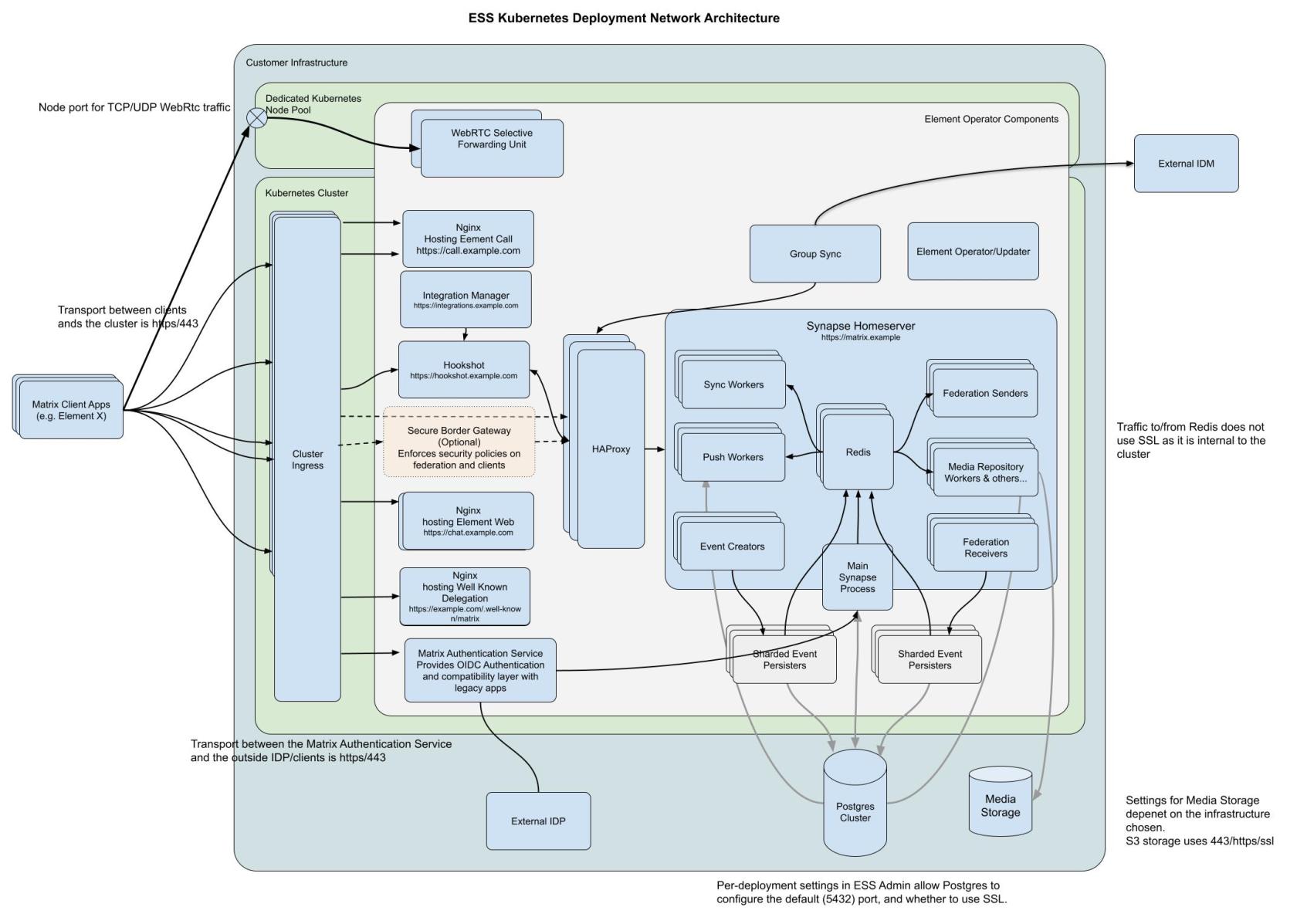](https://ems-docs.element.io/uploads/images/gallery/2025-02/1000001285.jpg)
(Please click on the image to view it at 100%.)